Radio Configuration
The ESC-R-150 running ESCape32 revision 17 or later exposes its complete settings menu over CRSF. With ExpressLRS, you open that menu through the standard ExpressLRS Lua script normally installed on the radio. TBS users can open the same CRSF device menu through Agent Lite.
After the initial setup, settings can be read, changed and saved over the radio link while the ESC remains installed. No PhotonDrive-specific script, USB adapter or Betaflight passthrough is required.
Requirements
- An ESC-R-150 running ESCape32 revision 17 or later
- An ExpressLRS or TBS receiver with a full-duplex CRSF connection (TX and RX)
- The standard ExpressLRS Lua script on an ELRS radio; it is usually already installed in the radio’s Tools menu
- A CLI or ESCape32 Wi-Fi Link connection for the one-time activation
Remove the propeller and secure the motor before setup. Keep the model disarmed while reading or changing parameters.
Wiring
CRSF configuration is bidirectional. Wire both data paths and ground; the TX and RX names below are from the receiver’s point of view:
| ESC-R-150 pad | Receiver connection |
|---|---|
| Signal Input | CRSF TX |
| Telemetry Output | CRSF RX |
| Signal Ground | Ground |
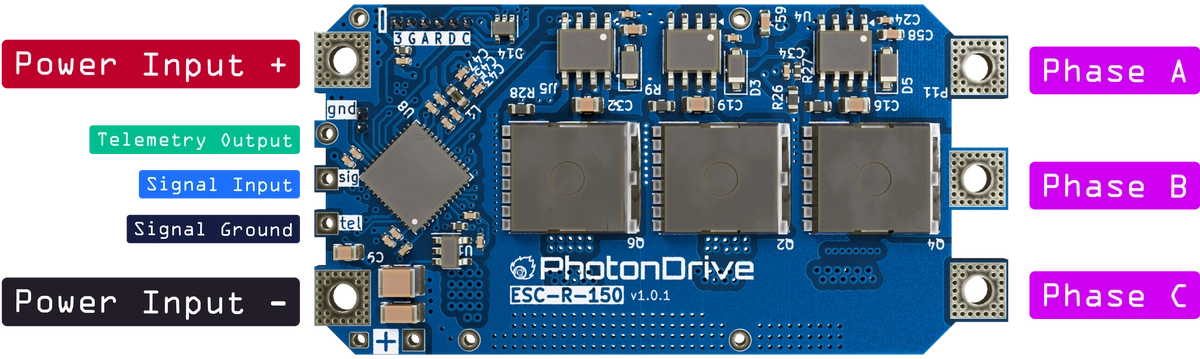
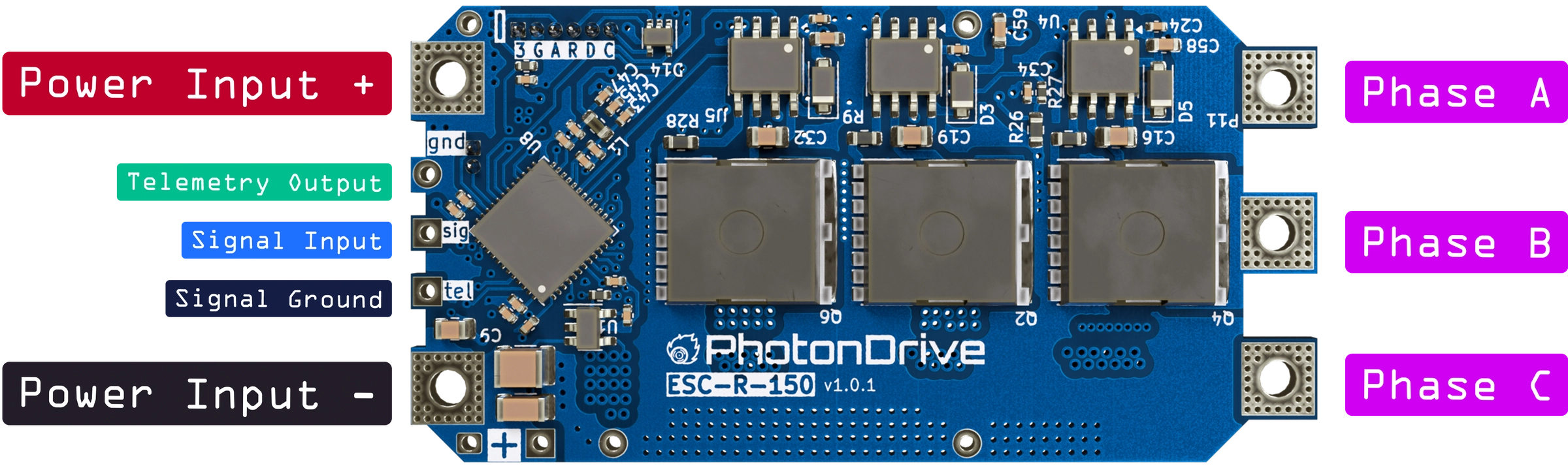
The Signal Input is connected to STM32G431 PA2, which supports CRSF input. ESCape32 sends CRSF replies and live telemetry through the separate Telemetry Output pad.
Enable CRSF once
CRSF is disabled in the default ESCape32 configuration, so the ESC cannot appear in the radio’s device list until it has been enabled once. Use the ESCape32 CLI or Wi-Fi Link and enter:
set input_mode 5
set telem_mode 4
set telem_phid 1
save
| Setting | Value | Purpose |
|---|---|---|
input_mode | 5 | Receive throttle and parameters over CRSF |
telem_mode | 4 | Send parameter replies and telemetry by CRSF |
telem_phid | 1 | Identify this ESC on the CRSF bus |
Power-cycle the ESC after saving. The new input and telemetry modes take effect only after a restart.
input_mode is exclusive. In CRSF mode the ESC no longer accepts servo, Oneshot125 or DShot throttle. Connect the receiver’s CRSF TX to Signal Input and, if needed, set input_ch1 to the CRSF channel that carries throttle.
Configure from the radio
- Power the receiver and ESC, and wait for the ExpressLRS link to connect.
- Open the radio’s Tools menu and start ExpressLRS (
elrs.lua). - Select Other Devices.
- Select ESCape32 ID:1 (or the ID assigned with
telem_phid). - Read or change settings, then select Save in the ESC menu to store them.
If ExpressLRS is missing from the Tools menu, follow the
official Lua script installation guide
and place the current script in /SCRIPTS/TOOLS. On a TBS radio, open the same
device menu with Agent Lite.
Multiple ESCs on one bus
Every ESC sharing a CRSF bus needs a unique telem_phid from 1 to 8. For
example, configure a second ESC with:
set telem_phid 2
save
After power-cycling, the radio lists the ESCs separately as ESCape32 ID:1, ESCape32 ID:2, and so on.
Telemetry
In CRSF mode the ESC reports telemetry every 32 ms. For correct RPM, set
telem_poles to the motor’s pole count; the default is 14:
set telem_poles 14
save
Voltage and current readings can be trimmed with telem_volt and telem_curr
to calibrate them against a known meter.
If the ESC does not appear
- Confirm that the ESC is running ESCape32 revision 17 or later.
- Recheck
input_mode 5andtelem_mode 4, settelem_phidto a value from1through8, then save and power-cycle. - Check all three connections: receiver TX to Signal Input, receiver RX to Telemetry Output, and ground to Signal Ground.
- Confirm that the receiver’s full-duplex CRSF port and telemetry are enabled and the radio link is active.
- If CRSF also supplies throttle, confirm that
input_ch1matches the assigned CRSF channel.
Reference
- ESCape32 — Configuration — CRSF input and programming settings
- ESCape32 — Settings — every parameter exposed in the device menu
- ExpressLRS — Lua script — installation and the Other Devices menu
- Demonstration video
Need help with your setup? Contact us.